Running your event
The Run workspace is where you operate a live event. It opens by default once the event has started.
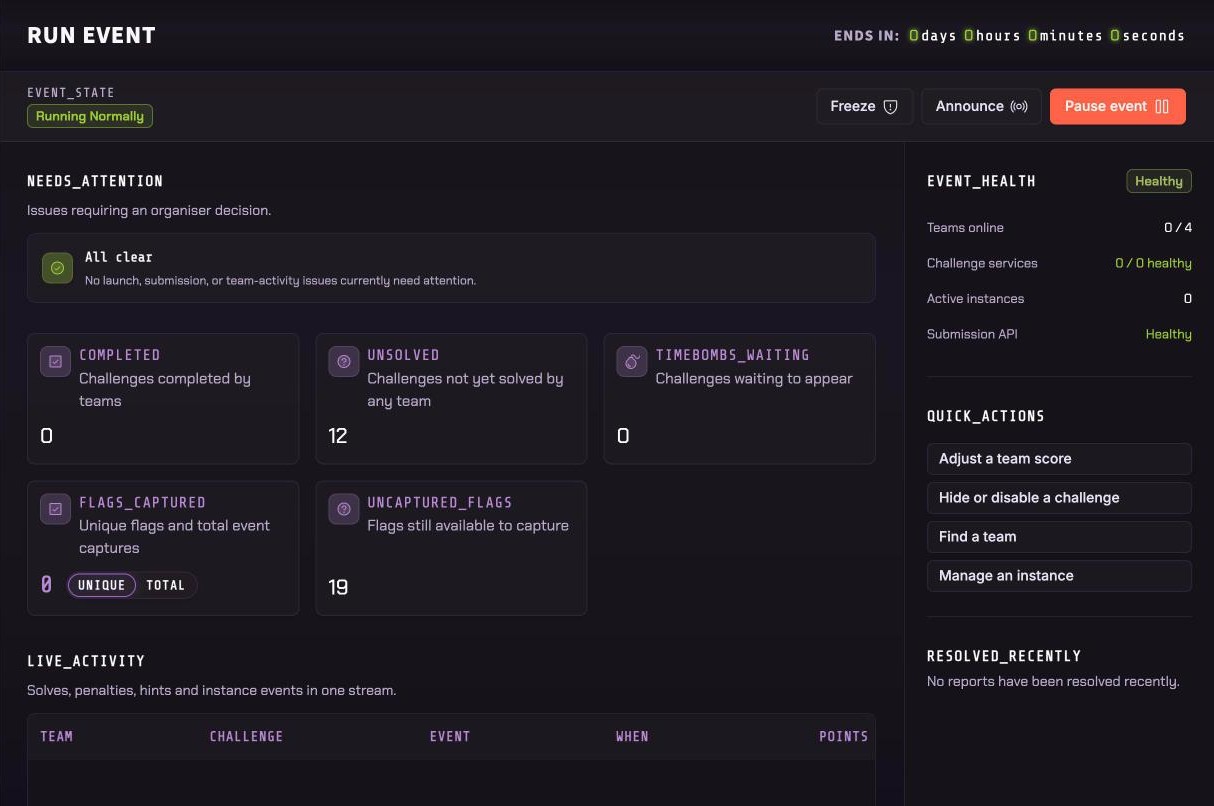
Event state
The bar at the top shows the current state, such as Running normally, with three actions:
- Freeze: stops the public scoreboard updating while play continues. Use it near the end to keep the result a surprise.
- Announce: send a message to players.
- Pause event: stop play for everyone, for example during an incident.
Needs attention
Issues that need an organiser decision appear here. Biterra checks for launch problems, submission problems and teams that have gone quiet.
At a glance
| Card | Meaning |
|---|---|
| Completed | Challenges completed by teams. |
| Unsolved | Challenges no team has solved yet. |
| Timebombs waiting | Challenges scheduled to appear later. |
| Flags captured | Unique flags and total captures in the event. |
| Uncaptured flags | Flags still available. |
Live activity streams solves, penalties, hints and instance events in one list.
Event health shows teams online, challenge services, active instances and the submission API.
Quick actions
- Adjust a team score
- Hide or disable a challenge
- Find a team
- Manage an instance
The Run pages
| Page | Use it to |
|---|---|
| Challenges | Compare solves, attempts, incorrect answers and hints per challenge. Filter by solved or unsolved. |
| Teams | Compare the same numbers per team. |
| Announcements | Write and schedule messages. See Announcements. |
| Problem reports | Work through problems players have reported, open or resolved. |
| Score submissions | Review submissions that need an organiser's decision. |
| Penalty log | See penalties applied. |
| Hint log | See hints bought. |
| Launch log | See launched instances, filtered by team, challenge and whether they are active. |
| Dungeon Master log | See the Dungeon Master lines sent to players. |